
Webhooks
Use webhooks to notify your application about esim exchange events.
Introduction
Use webhooks to notify your application about esim exchange events.
What is a webhook?
iRoamly uses Webhooks to push notifications about your eSIM QR code redemption/purchase to you. All Webhooks use HTTPS and provide a JSON payload that your application can use. You can perform the following actions using the Webhook source:
- Receive QR code information via webhook after redemption or purchase.
- Receive renewal results via webhook:
esim.renewal.successwhen the renewal QR code is ready,esim.renewal.failedwhen the upstream renewal order fails.
If your endpoint does not respond with a 2xx status, iRoamly automatically retries the request up to 5 times: immediately, then after 30 seconds, 2 minutes, 3 minutes and 5 minutes.
Steps to receive a webhook
You can start receiving real-time events in your app using the steps:
- Create a local endpoint to receive requests
- Register your development webhook endpoint on the Developers tab of the iRoamly dashboard
1. Create a local endpoint to receive requests
In your local application, create a new route that can accept POST requests.
For example, you can add an API route on Next.js:
import type { NextApiRequest, NextApiResponse } from 'next';

export default (req: NextApiRequest, res: NextApiResponse) => {
  if (req.method === 'POST') {
    const payload = req.body;
    console.log(payload);
    res.status(200);
  }
};
On receiving an event, you should respond with an HTTP 200 OK to signal to iRoamly that the event was successfully delivered.
2. Register your development webhook endpoint
Register your publicly accessible HTTPS URL in the iRomly dashboard.
You can create a tunnel to your localhost server using a tool like ngrok.
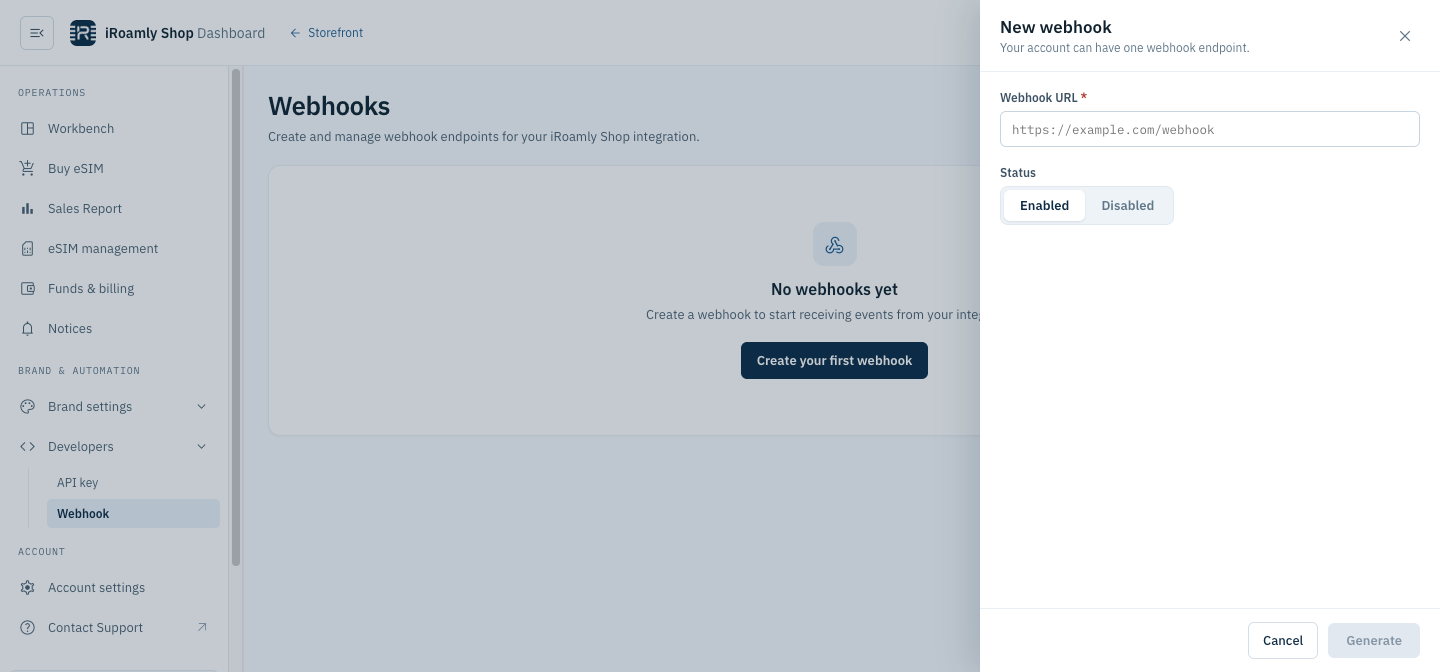
3. Test that your webhook endpoint is working properly
Create a few test buy to check that your webhook endpoint is receiving the events.
Event Types
List of supported event types and their payloads.
Delivery
Every event is delivered the same way: a POST request with a JSON body to each endpoint subscribed to the event. Any 2xx response counts as delivered; otherwise the request is retried up to 5 times (immediately, then after 30 seconds, 2 minutes, 3 minutes and 5 minutes). Each request carries these headers:
See Verify Webhook Requests for how to check the signatures.
esim.qrcode
Information related to the eSIM QR code that is returned after redeeming or purchasing the eSIM QR code.
Sample Request Body
{
	"code": 0,
	"data": {
		"activation_code": "CD112885573C49DDA42F64C905B925F4",
		"code": "UtTpoKCe769u2tt",
		"create_at": "2025-09-01 11:34:30",
		"isrenew": 0,
		"order_id": "ESIM202509021134343282",
		"plan_name": "Japan-eSIM-3GB-15 Days-Daily",
		"qrcode": "https://www.iroamly.com/qrcode/20250901/xSQfryvOWo0QUhsGcbpeTm9wWYfGu9BQ.png",
		"qrcode_content": "LPA:1$rsp1.cmlink.com$CD352885573C49DDA42F64C905B925F4",
		"sm_dp_address": "rsp1.cmlink.com"
	},
	"event_type": "esim.qrcode"
}esim.renewal.success
Sent when a renewal succeeds: once the upstream provider returns the download details of the renewal order, the QR code of the renewal code is filled in and its status becomes 2 (Redeemed).
Request Headers
esim.renewal.successThe request also carries X-Webhook-Delivery, X-Webhook-Timestamp, X-Webhook-Signature and X-Webhook-Signature-V2, as every event does (see Event Types).
Sample Request Body
{
	"code": 0,
	"data": {
		"activation_code": "CD112885573C49DDA42F64C905B925F4",
		"code": "RnB7xTq2Lm9pQaZ",
		"create_at": "2026-10-28 09:12:41",
		"download_url": "LPA:1$rsp1.cmlink.com$CD352885573C49DDA42F64C905B925F4",
		"iccid": "8944501234567890123",
		"iscouldrenewal": 1,
		"isrenew": 1,
		"plan_name": "Japan-eSIM-3GB-15 Days-Daily",
		"qrcode": "https://www.iroamly.com/qrcode/20261028/xSQfryvOWo0QUhsGcbpeTm9wWYfGu9BQ.png",
		"qrcode_content": "LPA:1$rsp1.cmlink.com$CD352885573C49DDA42F64C905B925F4",
		"renew_order_id": "TG202610280912410001",
		"renewal_father_code": "UtTpoKCe769u2tt",
		"sm_dp_address": "rsp1.cmlink.com"
	},
	"event_type": "esim.renewal.success"
}
Fields
esim.renewal.failed
Sent when a renewal fails: the upstream provider answers the renewal order with a code other than 0000, or the request to the provider fails.
(Note: A missing or late callback from the upstream provider does not trigger this event. Set a timeout and fall back to querying the code — see Handling Renewal Events.)
Request Headers
esim.renewal.failedThe request also carries X-Webhook-Delivery, X-Webhook-Timestamp, X-Webhook-Signature and X-Webhook-Signature-V2, as every event does (see Event Types).
Sample Request Body
{
	"code": -1,
	"data": {
		"code": "RnB7xTq2Lm9pQaZ",
		"create_at": "2026-10-28 09:12:41",
		"error_msg": "TuGe_RenewOrderEx RespCode: 9999",
		"isrenew": 1,
		"plan_name": "Japan-eSIM-3GB-15 Days-Daily",
		"renewal_father_code": "UtTpoKCe769u2tt"
	},
	"event_type": "esim.renewal.failed"
}
Fields
Renewals and esim.qrcode
Renewals are no longer delivered as esim.qrcode; that event is now sent only for purchases and redemptions. Compared with the esim.qrcode payload:
event_typeand theX-Webhook-Eventheader areesim.renewal.successoresim.renewal.failed, andisrenewis1.data.codeis the new redeem code created by the renewal; the code that was renewed isdata.renewal_father_code.esim.renewal.successaddsrenew_order_id,renewal_father_code,iscouldrenewal,download_urlandiccid, and has noorder_id.- A failed renewal is reported by
esim.renewal.failed, with top-levelcode-1and the upstream error indata.error_msg.
Event Subscriptions
New endpoints are subscribed to all three events by default. Existing endpoints receive esim.renewal.success and esim.renewal.failed automatically — no change is needed.
Handling Renewal Events
- Make your handler idempotent. A retry can deliver the same event more than once, so deduplicate by
X-Webhook-Deliveryor byevent_type+data.code, and ignore events you have already processed. - Use a timeout fallback. If neither
esim.renewal.successnoresim.renewal.failedarrives within a reasonable time, query the code with the query API (for example Query QR Code) instead of assuming the renewal failed. - Do not use
esim.renewal.failedto decide refunds. It reports only that the upstream order failed; whether and when Credit is refunded is decided separately, so do not credit your customers based on this event.
Verify Webhook Requests
How to verify iRoamly signature on webhook objects.
How to verify iRoamly signature?
iRoamly signature is sent in the X-Webhook-Signature header of the webhook request, as sha256= followed by the hex-encoded signature. The signature is generated using the HMAC-SHA256 algorithm with the webhook secret as the key, and the raw request body (exactly as received, before any JSON parsing) as the message.
Sample Webhook Header
{
'X-Webhook-Signature': 'sha256=dd7bdd2cf1f6bac6e171c6c508c157b7cd3cc1fd196394277fb59ba0bdd9b87b'
}
You can find your webhook secret on the Developers>Webhook page.
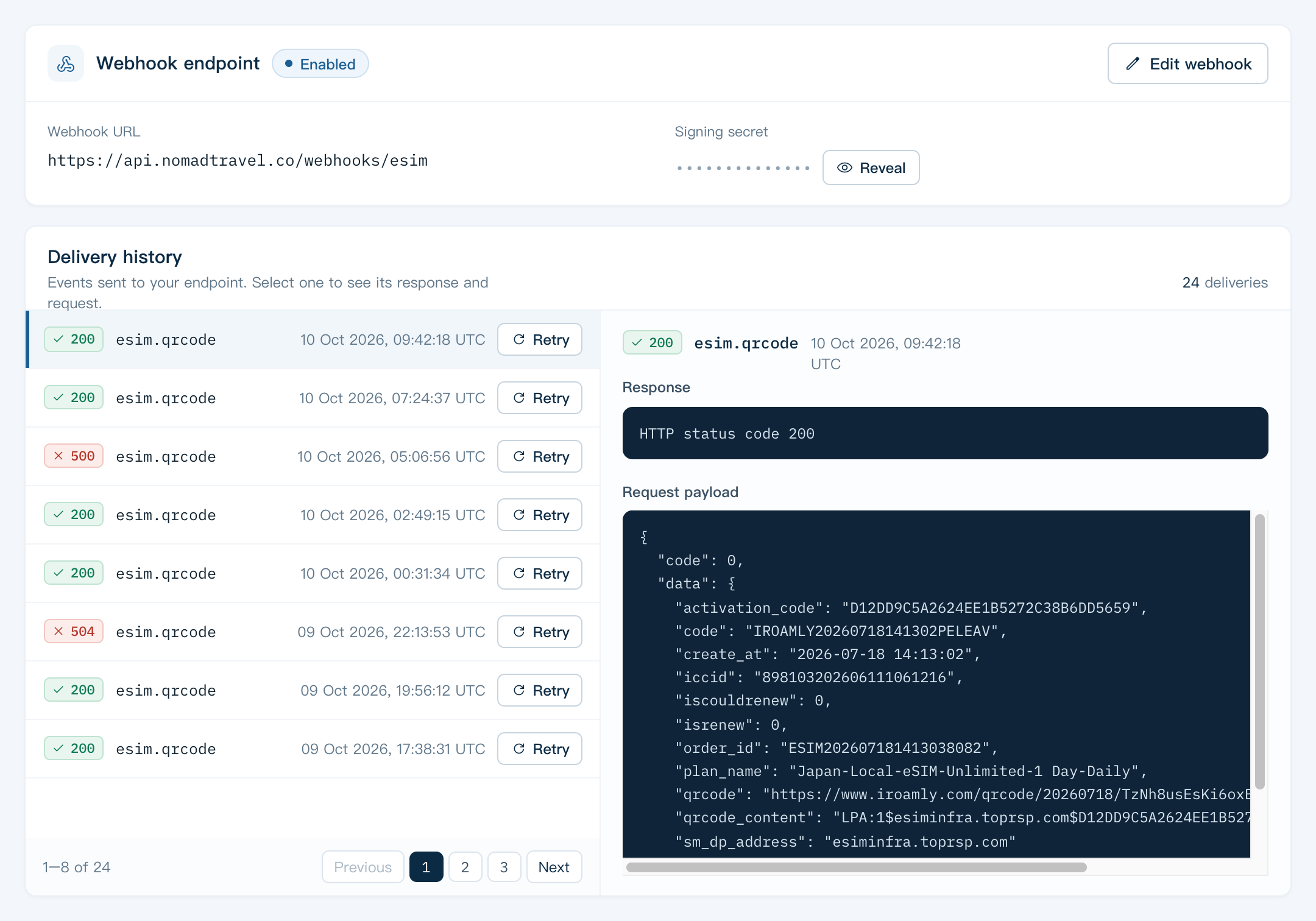
To generate the signature, you can use the following code snippet:
import * as crypto from 'crypto';

  generateSignature(payload: string, secret: string): string {
    const computedSignature = crypto
      .createHmac('sha256', secret)
      .update(payload)
      .digest('hex');
    return 'sha256=' + computedSignature;
  }
In the code snippet above, the payload is the raw request body, and the secret is the webhook secret. Simply compare the generated Signature (including the sha256= prefix) with the X-Webhook-Signature header value to complete the verification process.
Timestamped signature (X-Webhook-Signature-V2)
Each request also carries X-Webhook-Signature-V2: v1= followed by the hex-encoded HMAC-SHA256, with the same webhook secret, of {timestamp}.{body} — the X-Webhook-Timestamp header value, a dot, and the raw request body.
After you rotate the webhook secret, the old secret stays valid for 24 hours. During that period X-Webhook-Signature is still signed with the old secret, and X-Webhook-Signature-V2 carries one value per secret, separated by commas (v1=<old>,v1=<new>): accept the request if any value matches.